







Infor CPQ and QuickBooks Integration: Stop Re-Keying, Start Scaling

Infor CPQ and QuickBooks Integration: Stop Re-Keying, Start Scaling
Infor CPQ and Quickbooks integrationStop Re-Keying, Start Scaling

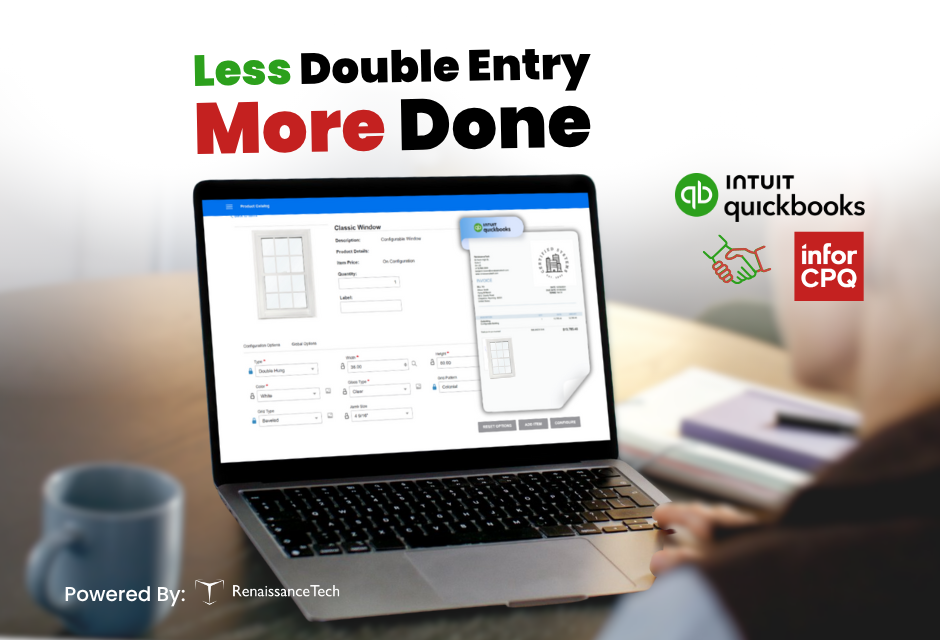
For small to midsized manufacturers, efficiency matters. Managing complex product configurations, generating accurate quotes, and tracking financials across disconnected systems can slow your business down. By connecting QuickBooks with Infor CPQ, you can simplify both your sales and accounting processes.

At RenaissanceTech, we specialize in implementing and integrating Infor CPQ in order to help manufacturers connect it with other essential business systems like QuickBooks. This connection streamlines workflows, reduces manual entry, and improves visibility across teams.


Connect Product Configuration to Financials

Infor CPQ makes it easy to configure custom products, send quotes, and convert those quotes into orders. With QuickBooks integration, those order details—including product specs, pricing, and customer-specific discounts—flow directly into QuickBooks. This allows your finance team to invoice quickly and accurately, without re-entering data.

This integration supports automated invoicing, pulling order information from Infor CPQ to create QuickBooks invoices in real time. That means fewer delays, more accurate records, and faster payment cycles.


Accurate Financial Reporting and Inventory Updates

Once integrated, Infor CPQ and QuickBooks work together to give you real-time visibility into both sales activity and financial performance. Sales data from Infor CPQ can be reflected in QuickBooks, enabling up-to-date financial reporting and profit tracking by product or order.

QuickBooks also manages inventory levels. As orders are completed in Infor CPQ, inventory is updated automatically in QuickBooks, helping you avoid overstocking or running out of product unexpectedly.


Centralized Customer Data

Customer information can flow between both systems, creating a shared view of contacts, billing, shipping, and payment history. With synced data between CPQ and QuickBooks, both sales and finance teams can access accurate customer records without switching systems or entering data twice.


Built for Speed and Security

Our integration allows Infor CPQ to interact with QuickBooks without requiring frequent logins or causing session timeouts. This improves speed and user experience while respecting QuickBooks' security protocols.


Why Integrate Infor CPQ with QuickBooks?

If your team is manually entering order data from one system into another, you're losing time and increasing the risk of errors. Integrating Infor CPQ with QuickBooks helps you:

  • Eliminate duplicate data entry
  • Improve quote and invoice accuracy
  • Accelerate the order to cash process
  • Enhance financial visibility
  • Free up your team to focus on more strategic work


Common Questions About the Integration

Can Infor CPQ integrate with QuickBooks Online?

Yes. RenaissanceTech has integrated Infor CPQ with QuickBooks Online to support seamless invoicing and real-time transfer of order and pricing data.

Does QuickBooks handle manufacturing functions?

QuickBooks Online is focused on accounting and financial management. It does not include manufacturing or operations tools. Infor CPQ fills that gap by handling product configuration and quoting, and then syncing the results to QuickBooks for billing and financial reporting.


Let’s Simplify Your Workflow

Infor CPQ helps your team sell custom products with speed and accuracy. When connected to QuickBooks, it also helps you close the loop between quoting, ordering, and invoicing.


Want to learn more about integrating Infor CPQ with QuickBooks?

Let's Talk

CPQ Add-ons That Fit Your Business

CPQ Add-ons That Fit Your Business

At RenaissanceTech, we know that a one-size-fits-all approach doesn’t work when it comes to CPQ. Every business has its own workflows, technical landscape, and customer expectations. That is why our services are designed to make Infor CPQ work for you, aligning closely with your unique processes, products, and goals.

Whether you’re working in the cloud or on-premise, integrating with ERP systems, or looking to improve the way you present configurable products, our team brings the experience and technical creativity to extend CPQ in ways that are meaningful to you. Below are just a few of the solutions we offer to help customers get more value from Infor CPQ.

DocuSign: Sign, Seal, and Store  

Speed matters in the sales process, and so does simplicity. That’s why we’ve built an integration between Infor Enterprise Quoting (EQ) and DocuSign that enables customers to sign quotes directly within the document itself. There's no need to download files, print and scan, or chase down approvals over email. With a few clicks, the quote is signed, sealed, and stored, making the sales cycle faster and more efficient, while maintaining a professional and secure experience for both internal teams and customers. Get more info about the DocuSign integration here.

Stitch Images: Visual Flexibility Without the Overhead

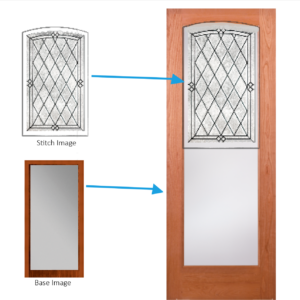
For many companies, especially those with highly configurable products, showing an accurate visual of the end result is key to closing a sale. But creating individual images for every possible product combination is time-consuming and inefficient. That’s where our custom image stitching tool comes in, built exclusively for on-premise Infor CPQ users.

This add-on feature allows you to combine two or more product images on the fly, creating a composite visual that reflects the selected options in the configurator. It supports dynamic image layering and enables real-time visualization as users make their selections.

Some key benefits of the stitch tool include:

  • Mix-and-match flexibility – Combine components, colors, or accessories in real time
  • Reduced design workload – Eliminate the need to pre-create images for every possible combination
  • Consistent visuals – Maintain a unified look across all stitched images
  • Faster load times – Fewer total image files means leaner web performance
  • Customer clarity – Help buyers see exactly what they’re getting before they commit

If aesthetics and visual appeal plays a role in your customer’s buying process, Stitch Images is essential.

VISUAL ERP SQL Lookup: Real-Time Data

One of the biggest challenges with cloud-based configurators is accessing real-time data from on-premise ERP systems. Our SQL Proxy tool solves that problem. It allows Infor Cloud CPQ to execute SQL queries against an on-prem database—such as VISUAL ERP—and return live data directly into the configurator.

Let’s say you price your products using a cost-plus model. As the user configures a product, their selections drive the inclusion of certain materials or components. The SQL Proxy tool dynamically builds a query based on those selections, then retrieves the actual raw material costs from VISUAL ERP. This data is used to calculate the total cost and inform pricing, all without needing to duplicate ERP data into CPQ.

In short, it keeps your pricing accurate and your data consistent—without the manual work or system lag.

SwiftSell: A Smart Sales Portal Alternative for On-Prem Users

If you're still operating on-premise and not yet ready for cloud migration, SwiftSell is the ultimate alternative to Infor Sales Portal. It offers a lightweight, browser-based solution that brings CPQ functionality to your sales team, with a clean, modern UI and fast implementation time. SwiftSell gives users direct access to the configurator and quoting tools they need, operating as a selling portal for both internal and external users.

It’s designed for speed, usability, and integration with your existing systems, without making major changes to your infrastructure.

EDI Integration: Automate Order Creation

Manual data entry slows down operations and introduces risk. Our EDI integration addresses that by automating the creation of orders in SyteLine once a quote or configuration is complete. Order data can be submitted in multiple ways: through uploaded files, direct database queries, or via API endpoints that accept web-based submissions.

Once the data is received, our integration generates a complete order, including:

  • Order header information
  • Detailed configuration data from CPQ
  • Associated work orders ready for production

This automation ensures that sales, engineering, and production are always in sync. It also reduces errors, accelerates turnaround times, and frees up your teams to focus on value-added tasks instead of paperwork.

At RenaissanceTech, we don’t just implement Infor CPQ. We build smart, practical solutions that help you get more from your investment. Whether you're looking to improve visual elements of configuration, streamline sales, connect to legacy systems, or automate key processes, we’re here to make CPQ fit your business, not the other way around.


Let us know how we can help bring your CPQ vision to life!

CPQ and Salesforce: The One True Pairing

CPQ and Salesforce: The One True Pairing

Now more than ever technology is improving all aspects of a company: including sales. Salesforce and Infor CPQ are a powerful application for growing businesses. Many manufacturers and distributors choose to use either or both systems today. Many companies choose to integrate and/or connect these systems when they own the latter option. A CRM and CPQ being integrated adds the ability to pull CRM information into your configurator and adversely launch your product configurator directly in Salesforce. This ensures that your front-end team is creating fantastic quotes quickly no matter the customer and/or special requests and circumstance.

Salesforce.com’s motto is “We bring companies and customers together”. When users add Infor CPQ they bring their sales team and dealers into the mix. Mistakes and human errors will occur throughout any business process. Streamlining each process with automation and technology is the only way to minimize this inevitable cost and time waste. When a CRM is integrated to a product configurator like Infor Configure Price Quote (Previously known as “BuyDesign”), users can pull their customer’s standard information, shipping details, and any additional CRM data into CPQ to create a quote and proposal document for the customer. This sharing of data is not only one-way, CPQ can send quote status and any additional order information to CRM in real time as well.

Lastly, when Infor CPQ’s product configurator is connected to Salesforce CRM, users can launch their configurator directly out of Salesforce. There is no need to navigate to a different application for quote and proposal creation. This makes it simpler for new hires and seasoned sales reps and keeps everyone on the same home screen. The best pairing in enterprise software for any manufacturer is a CRM and CPQ integration. Users can pull CRM information into CPQ and launch configurator from Salesforce when you connect these two systems.

Interested in learning more about the Salesforce and CPQ integration? Contact us

Why You Need Infor CRM

Why You Need Infor CRM

Why You need Infor CRM

This Blog is authored by our trusted Infor CRM Partner, Simplesoft Solutions, Inc.
By: Jessica Wert, Marketing Coordinator at Simplesoft Solutions, Inc.
March 31st, 2020


Often we see manufacturers utilizing the latest and greatest technology in their factories and making the investments in ERP software to keep production efficient. What about where it all begins….the sales department.

Are you arming them with the best tools to generate more orders? Are you able to see all the crucial parts of the quote to order process in one place?

Bringing Infor CRM to your sales process can complete the picture. Infor CRM allows manufactures’ to build a complete sales process customized to their business. With functions like Opportunity, Activity, Lead and Account Management you can create a process that drives sales growth.

Sales professionals have a lot to keep up with; emails, quotes, bid due dates, customer visits and the list goes on. It is near impossible to keep up and remember everything. With an opportunity management process to create and follow up on quotes with customers; leadership and sales can stay in the loop on what needs done and by when. Combined with the activities and alerts in CRM sales staff will never miss a bid deadline or forget to follow up. Infor CRM also gives you mobile and Outlook versions that all sync in real time, making it extremely efficient. Record emails and notes directly from your Outlook with Xbar and have customer information in the palm of your hand with Infor CRM mobile. Using a CRM to control your sales process leads to more closed opportunities.

Another piece that is important to manufacturers is the Infor ION Integration. This Infor CRM out of the box Integration brings CRM, ERP and even your Configure Price Quote (CPQ) software together. Not to mention other 3rd party software tools you may be using. Having your software “talking” back and forth creates a cohesive business environment. Giving access to data across departments for sales, production, accounting and service will lead to increased sales and pipeline visibility.   Creating this visibility to quotes, orders and general sales notes helps other departments jump in when needed to help close a sale. Now forecasting, setting quotas and communicating lead times are easier than ever.

Ask yourself; why not invest more in one of the most important departments in your company? Sales! Arm your team with all the tools to succeed. Remove the road blocks of forgotten information so that they can focus on selling. Infor CloudSuite CRM can do some of the heavy lifting for them; making them more efficient and better sales professionals!


Simplesoft Solutions, Inc. is a customer relationship management (CRM) business consulting and software development firm. We provide implementation, integration, development and training for Infor CloudSuite CRM. We have been helping our customers develop stronger relationships with their customers through improved sales, marketing, customer service, and support processes since 1994.

Infor CloudSuite CPQ at RenaissanceTech

RenaissanceTech has over 200 successful CPQ implementations and is the only Infor CPQ specific channel partner. The founders of RenaissanceTech worked on the initial development of the infor CPQ solution. If you want to work with the experts in CPQ implementation, servicing, and support, contact RenaissanceTech today.

Utilizing a CRM System? Integrate with Infor Configure Price Quote

Utilizing a CRM System? Integrate with Infor Configure Price Quote

The Infor Configure Price Quote(CPQ) suite of applications can be integrated into many Customer Relationship Management systems. The configurator, where the guided selling process takes shape, can be accessed within a CRM system providing users access to product options and quoting documents.

No CRM System? Infor was just named as a leader in Customer Relationship Management. Contract RenaissanceTech today to learn how your CRM system can be integrated to Infor CPQ!

Infor Customer Experience Suite Recognized for Usability and Functionality

NEW YORK –  May 01, 2018

Infor, a leading provider of industry-specific cloud applications, today announced the company has been named a Leader in the Nucleus Research Customer Relationship Management (CRM) Value Matrix. Leaders in the CRM Value Matrix for the first half of 2018 are augmenting functionality with more embedded analytics and artificial intelligence (AI), and advancing usability both on the desktop and mobile devices.

Key areas of investment in functionality for CRM vendors included in the Matrix include: mobile capabilities; AI and embedded analytics which can enable individual user-level personalization; and integration and orchestration, which can help link customer data in meaningful ways across departments.

“In order to be competitive in CRM today, vendors need to deliver ongoing innovation in upgrades that can easily be digested and adopted without too much disruption to the business,” said Rebecca Wettemann, vice president, Nucleus Research. “Leaders in the CRM Value Matrix are augmenting functionality with more embedded analytics and artificial intelligence (AI), and advancing in usability both on the desktop and mobile devices. Those who haven’t modernized their user interface or made mobile design and configuration accessible for non-developers are lagging in the market.”

Of note for this Value Matrix were updates that Infor continues to incorporate to the Customer Experience (CX) Suite of applications. Specific enhancements to the CX Suite since the last Matrix include out-of-the-box integration with Marketo, a bi-directional data sync and Sales Insight that is designed to provide a holistic overview of a lead’s journey and behaviors, as well as embedded mapping services added to the geocoding and mapping functionality in Infor CRM Contour.

“Our vision is to empower sales and marketing professionals with the best and most effective tools on the market to help them connect, engage, and create valuable relationships with their customers,” said Jason Rushforth, vice president and general manager, Infor Customer Experience. “Infor is proud to once again be recognized by Nucleus Research for our continued efforts to innovate our products and support our customers.”